This article introduces a case where parameter adjustments made for business needs led to performance anomalies in other business areas. It includes the investigation and analysis processes.
Directory Navigation
Phenomenon
The on-site feedback is that an SQL query has been running for over three hours and has not finished. At the same time, multiple SQL queries in the cluster are taking much longer than usual to complete.
The current cluster is version 862. We are preparing to upgrade to version 953. Due to this issue, the customer is requesting an analysis of the cause and whether this issue also exists in version 953.
Troubleshoot
View SQL running on the cluster
The longest run is 12,000 seconds, which is over 3 hours. There's another one after it with over 10,000 seconds. The SQL looks like users are executing it repeatedly.
SELECT COORDINATOR_NAME, ID, user, host, command, start_time, time, state, SUBSTRING(info, 0, 100) AS info FROM information_schema.COORDINATORS_TASK_INFORMATION WHERE command = 'query' AND time >= 0 ORDER BY time DESC LIMIT 10;The SQL started executing at 20:14:05.
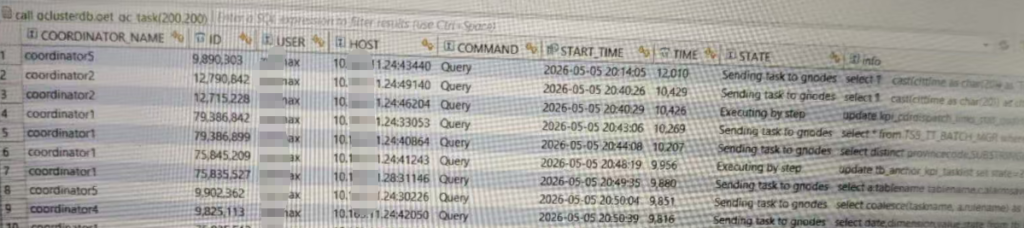
View Compute Node SQL
The compute node execution time is 12000 seconds, which corresponds to the cluster layer. Additionally, all SQL statements are on node3, indicating that this node is the cause of the problem.
SELECT NODE_NAME, ID, user, host, command, start_time, time, state, SUBSTRING(info, 0, 100) AS info FROM information_schema.GNODES_TASK_INFORMATION where command='query' and info is not null and info is not like '%information_schema.processlist%' order by time desc limit 10;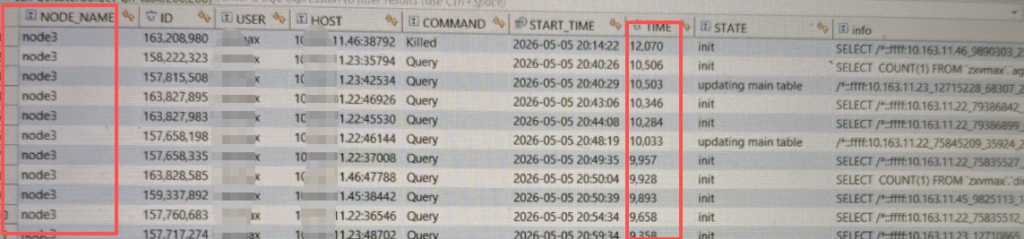
Log in to node3 and check for environmental errors.
No environment errors were found.
dmesg | grep -i error
View operating system logs
Indeed, it's normal; no hardware or operating system error messages were observed.
tail /var/log/messages
View memory
Memory is sufficient, no swap is being used.
free -g
Check if system resources are continuously busy
As can be seen, the disk remains consistently busy at 1001 TP3T, with a write rate of 900 MB/s, indicating an extremely high volume of sustained writes.
iostat -xdc 1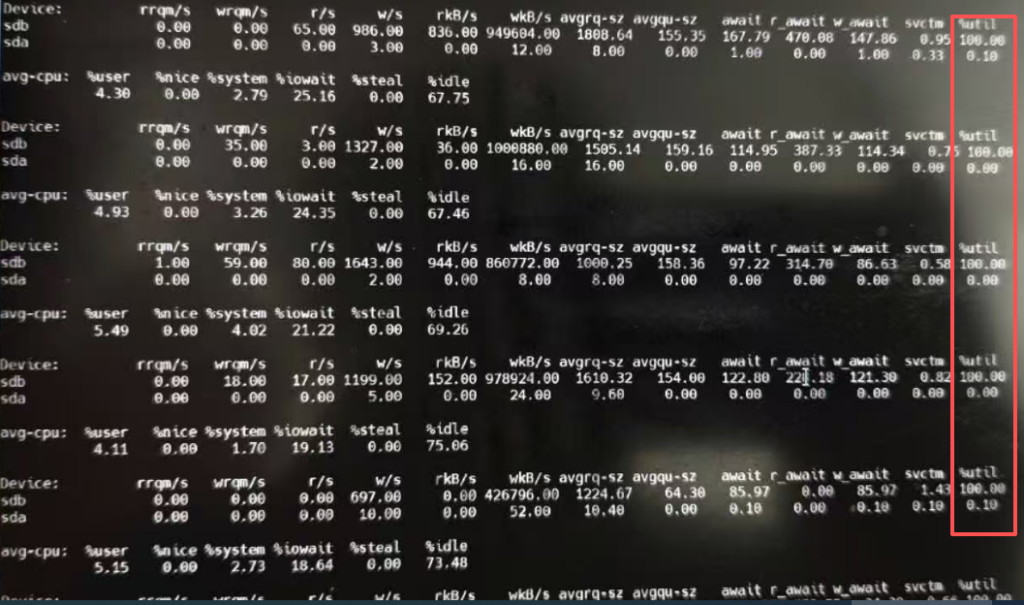
View user operating system monitoring history
After 8 PM, there was a sudden increase in disk usage that has continued until now. This time corresponds with when the SQL started executing.
The following are OS resource monitoring records.
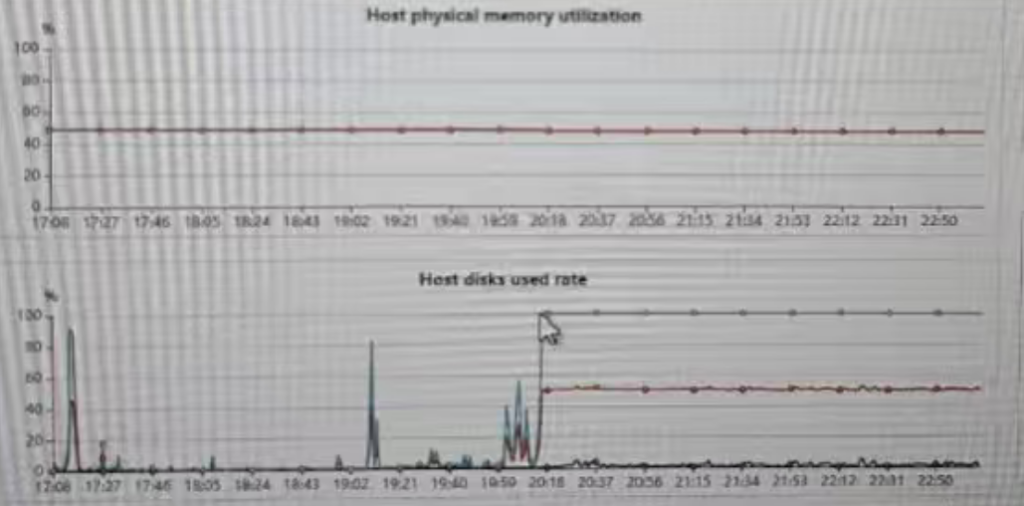
View database temp directory
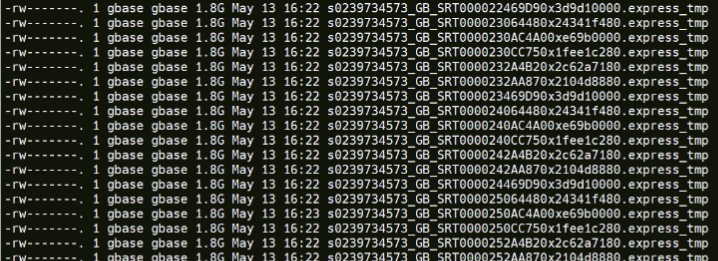
Discovered thousands of temporary files, type SRT, used for sorting. File size 10TB+.
du -sh /gnode/tmpdata/*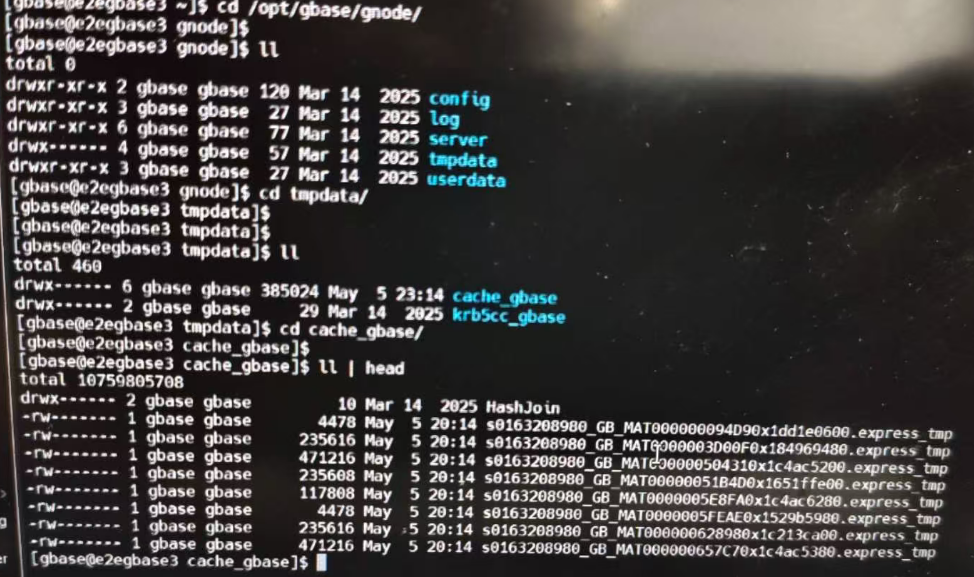
Business SQL Performance Troubleshooting
Confirm business SQL
A simple TOP N SQL query with ORDER BY and LIMIT 1000 rows, without an outer GROUP BY clause.
SELECT
xxxx
FROM (
 ...
)a
LEFT JOIN (
  ...
)b ON ...
LEFT JOIN (
  ...
)c ON ...
ORDER BY xxx
LIMIT 1000
Inside is a left join of 3 subqueries.,
Confirm the row count of three joined tables layer by layer.
Three temporary tables were created using the `CREATE TABLE tmp_a AS SELECT ...` method for three subqueries respectively.
The first subquery is grouped by the main table, with 2 billion rows, resulting in 200,000 rows.
The second subquery is a dimension table with distinct values and returns 2000 rows.
The third subquery is a two-table left join with a group by, and its result set is also 20,000 rows.
Confirm the number of final result set rows one by one
Simplify SQL, remove all unnecessary projection columns, and directly count(*)
SELECT
  COUNT(*)
FROM a
LEFT JOIN
b ON ...
The first left join result set has 200K rows and took less than 10 seconds, with no Cartesian product occurring.
SELECT
  COUNT(*)
FROM a
LEFT JOIN b ON ...
LEFT JOIN c ON
The second left join result set is still 200,000 rows and takes less than 10 seconds.
In other words, this SQL is not caused by sorting large result sets. Then why does sorting 200,000 rows, especially with a LIMIT clause, generate so much SRT intermediate data?
Confirm which projection columns are causing performance issues
When changing `count(*)` back to the original SQL statement one by one, a problem occurred when a column in a temporary C table was involved.
Check temporary table structure
Check the table structure of temporary table C, and it is found that the column is of type longtext.
View original SQL
Found the column of temporary table C. The calculation is `group_concat(xxx)`, which means converting rows into columns.
Query max(length(xxx)), the original column values in the table only have a maximum of 10 characters, why is the generated intermediate table longtext?
View database parameters
show variables like '%group_concat_max_len%''The return value is 1M, not the default 32K.
Problem identification
Analyse
Parameter origin
The execution result of group_concat is 32K by default (corresponding to 10922 characters in the utf8 character set). If the execution result exceeds 32K, an error will occur (Aggregation function GROUP_CONCAT overflow
Please refer to the following article:Common Errors in Nanda Tongyong GBase 8a Clusters: Aggregation Function GROUP_CONCAT overflow
To solve this problem, the database added a parameter `group_concat_max_len`, which is the maximum length allowed for this function. The user set it to 1MB.
Origin of LONGBLOB type
If you want to save the direct result into a [temporary intermediate table], similar to `create table tmpXXX as select`, you need to [pre-evaluate] the column width; you cannot create the table after execution. The parameter value for that column is 1M, which exceeds the maximum allowed by `varchar` (32K), so the field type was evaluated as `longtext`.
Sorted disk usage reasons
When sorting, the projection columns involved in the sort must be materialized first.
Data requires pre-allocated memory to store materialized data. In version 862, memory was allocated based on the table structure. The maximum length of longtext is 64MB, which is insufficient memory, so it was written to a temporary file on disk.
200,000 lines, with each line being at least 64MB, multiply to 12.2TB. As a result, temporary files totaling over 10TB were written to disk. At a write speed of 1GB per second, this would still take 3.4 hours.
Why is there such a large temporary file only on node3?
View the main table SQL, which includes `group by clttime`, `cell_id`. `cell_id` is the cellular cell number and is relatively numerous. `clttime` is the collection date and is a single value for the day. This table is also a random distribution table without a hash column. Therefore, during the `group by` operation, the first column is selected as the distribution column, and all data falls onto a single node.
You can place the cell_id column first here to avoid this situation.
Or use all group by columns together as hash distribution columns, but this will affect performance. The parameter is
t_gcluster_hash_redistribute_groupby_on_multiple_expressionCan the parameters be adjusted?
This parameter was increased because other businesses did indeed have group_concat results exceeding 32K, but it caused other SQL statements to execute abnormally under this parameter. From a global parameter perspective, there is only one parameter value, which cannot perfectly match all scenarios.
Solution
Adjust SQL
Intervene in the execution result width evaluation of group_concat, for example, by wrapping it with substr.
substr(group_concat(xxx),0,1000)This way, the resulting width will not exceed 1000 characters, and the column type for the intermediate table will be varchar(1000).
The proposed solution was implemented on-site and completed in under 30 seconds.
Use hint
gbase 8a can dynamically adjust session-level parameter values through hints, for example
select /*+group_concat_max_len(3000)*/ ...This hint specifies that the maximum `group_concat` width for this SQL will not exceed 3000 bytes, which is equivalent to 1000 UTF-8 characters.
Upgrade to version 95
In version 95, memory allocation is not based on the maximum width of fields. Instead, a block of memory is allocated based on the current data, and if it's insufficient, more memory is continuously allocated. This reduces the actual memory footprint, and the corresponding intermediate result sets more closely resemble actual disk usage.
Summary
Due to parameter adjustments, the database memory evaluation was large, writing a large number of intermediate disk files for sorting. This caused the node's IO resources to be continuously busy, leading to a performance degradation of other normal SQL operations.
At the same time, one parameter cannot adapt to all scenarios, and some important business SQLs can use hints to set their own suitable parameters.